Check sound and file size before sharing a recording
A screen explanation may include an unwanted conversation or be too large to send comfortably. SimpleRec can make a copy without sound or try a lower resolution. Review whichever copy you choose before sharing it.
Decide whether the sound is useful
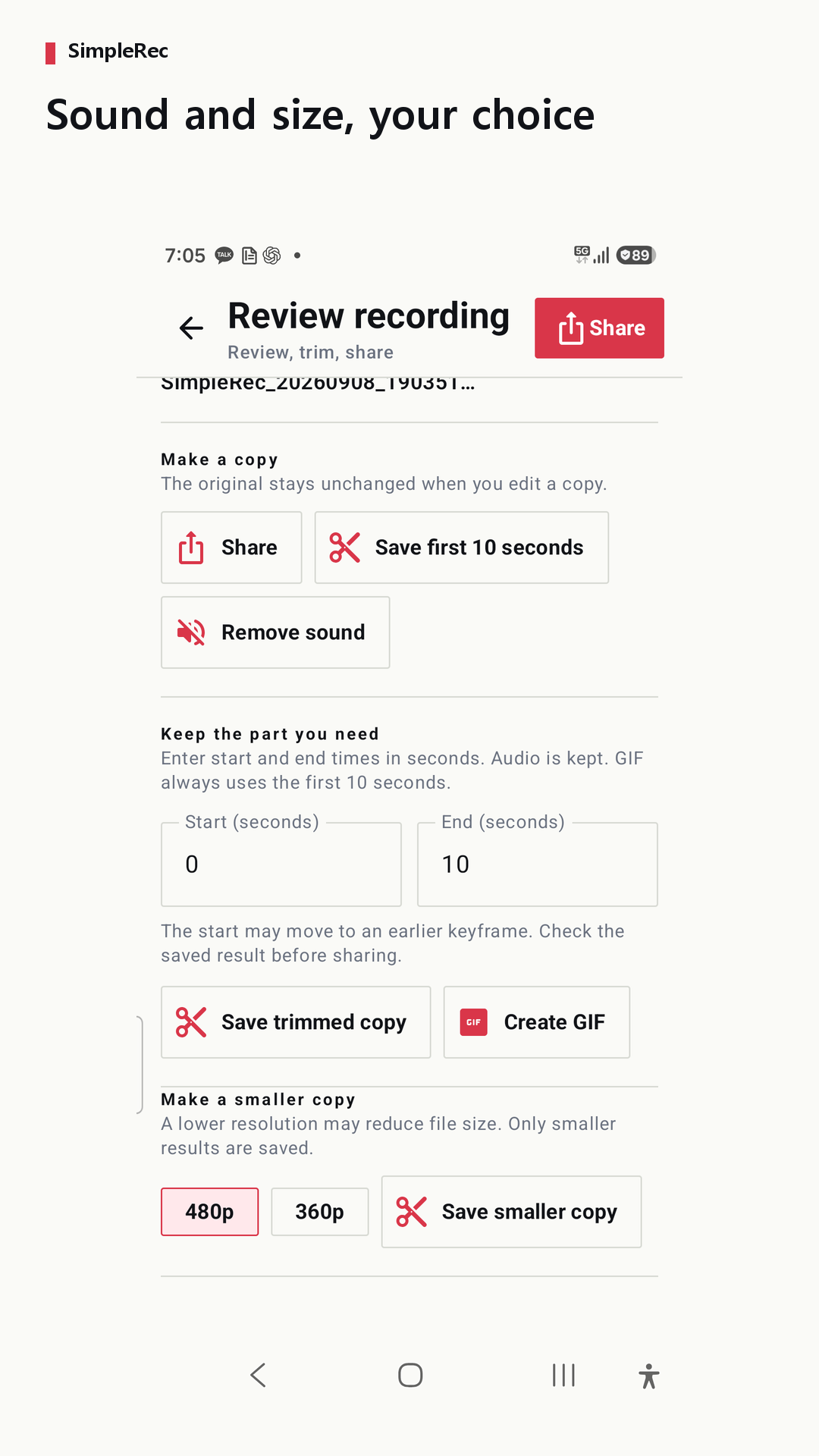
A video that only shows button locations may work without narration. In the recording review screen, remove sound to create a silent copy while keeping the original. Replay the copy to check the result. Also inspect the picture for private information: removing sound does not hide anything visible on screen.
Try a lower resolution for a smaller file
You can try a 480p or 360p copy. Re-encoding does not always reduce size: a video that is already small may become larger. SimpleRec only provides a reduced-size result when it is smaller than the original. Processing time depends on the recording and device.
Check that the text remains readable
Small settings labels or error messages can be harder to read at a lower resolution. Play the copy and check the parts the viewer needs to see. If readability matters more than reducing size, choose the original or a clearer copy. No particular compression ratio or final file size is guaranteed.
Check sharing and storage separately
Send the chosen copy through the Android share sheet. The receiving app’s size limits and file-handling policies apply. Device or gallery backup settings may also apply. On Android 8–9, uninstalling SimpleRec deletes files in its app folder, so save needed recordings elsewhere first.